¶ Blockly
Your own Blockly blocks can also be used to retrieve or set values directly from scripts. (Even if you only know the EUI and not the whole id).
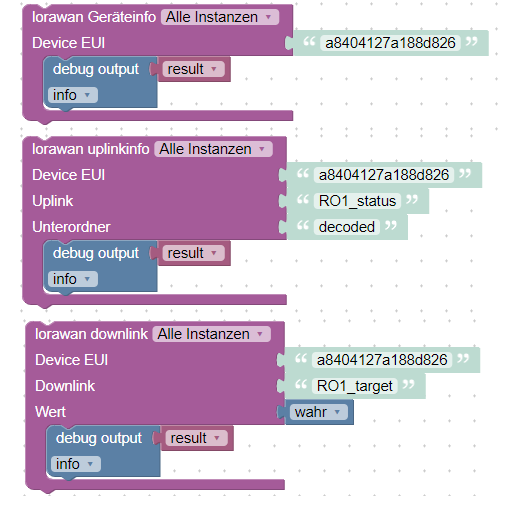
The blocks all return an object under the variable called result.
For example, this is structured as follows:
{
"applicationId":"d63c10b6-9263-4ab3-9299-4308fa19a2ad",
"deviceEUI":"a8404127a188d826",
"deviceId":"Relaistestgerät",
"deviceType":"Dragino LT22222",
"downlink":"RO1_target",
"value":true,
"recieved":{
"deviceEUI":"a8404127a188d826",
"downlink":"RO1_target",
"value":true
}
}
In the case of an incorrectly sent value (here in the following example the deviceEUI), this is output as follows:
{
"error":true,
"message":"No device found",
"recieved":{
"deviceEUI":"ausgedachteEUI",
"downlink":"RO1_target",
"value":true
}
}